


New data and privacy settings in Smartplan

You probably know the feeling of guilt. The thoughts that are always lingering in the back of your mind. Am I handling my employee data as I should? Or am I actually storing data that I shouldn’t according to GDPR? Should I hide more data among the employees? With the latest update in Smartplan, you can let go of these thoughts forever.
First and foremost, we have gathered all your data and privacy settings in one place in Smartplan, making it even easier for you to find this information going forward. To modify your settings, just go to “Settings” -> “Smartplan Settings” -> “Data & Privacy”.
New Absence Settings
At the top of the privacy settings page, you can choose what information your employees can see on the account. Whether they can see each other’s absences, the absence calendar, and each other’s contact information. You have always had the ability to do this. The new feature is that you now have an additional option regarding whether employees can see each other’s absences. Before, you could choose that they could either see all absences or all absences except for sickness. Going forward, you can now also choose that employees can see all absences, but not the type of absence:
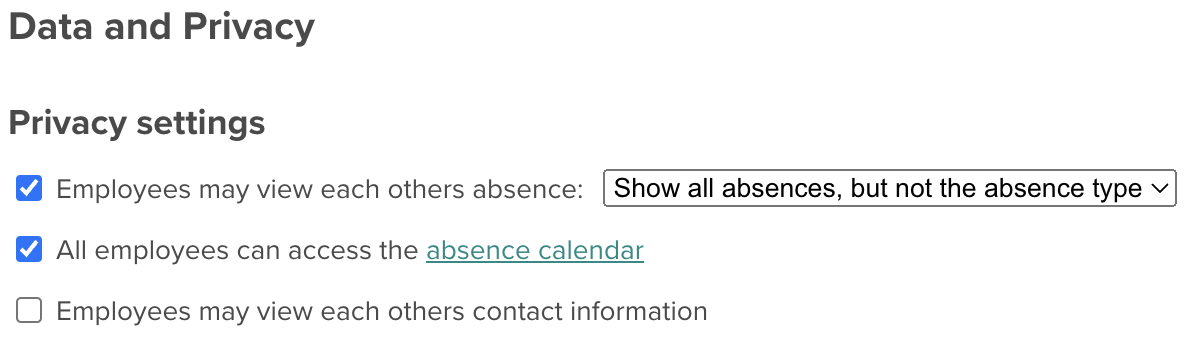
This means that you can now choose from even more settings to ensure that you comply with the specific requirements of your company.
Anonymize Deleted Employees
Furthermore, we have launched a new feature that allows you to anonymize deleted employees on your Smartplan account. The process is completely automatic, so it’s not something you have to do yourself. At the same time, you still retain all your data on the account. It’s just the employees’ names that will be anonymized. This means that you won’t lose your timesheets, but you can be sure that you are not storing data without a purpose.
The feature is flexible in that you can choose when your deleted employees should be anonymized on the account. You can choose to anonymize employees 1 year after they have been deleted. 10 years after deletion. Or anything in between. You can even choose to anonymize deleted employees immediately if you that’s what you prefer.
To activate the new feature, simply tick the box “I want Smartplan to anonymize my deleted employees after” and choose how many years should pass before anonymization takes place:

Once you have activated the feature, and your deleted employees have been anonymized, you will still be able to see the employees’ attended hours in Hours & Salary. However, the employees will now appear as “Anonymous Employee” followed by a number.
You can read much more about how to anonymize deleted employees in this article.
If you have any questions about the new update, you are always welcome to contact us at support@smartplanapp.com - we are ready to assist.
Smartplan
Published 26 January 2024
Ready to try Smartplan?
Start your free 30-day trial today. No commitment, no credit card required.
Try Smartplan freeGet to know Smartplan
Everything you need for shift planning, time tracking and employee management — all in one place.