


New in Smartplan: Live Activities on iPhones
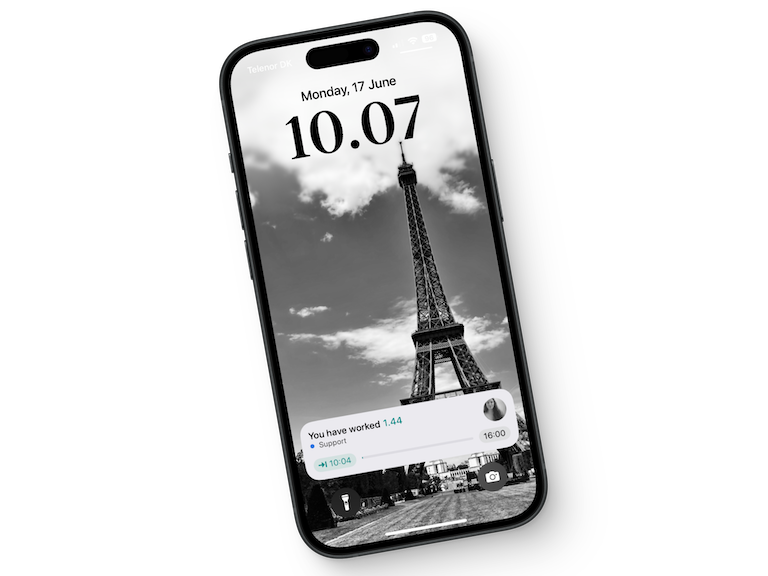
We have introduced a new update in our Smartplan app. With our new feature, live activities, your employees can now easily keep track of their working hours directly from their phones. They don’t even need to open the Smartplan app. Initially, the update is only available for iPhones.
What are Live Activities?
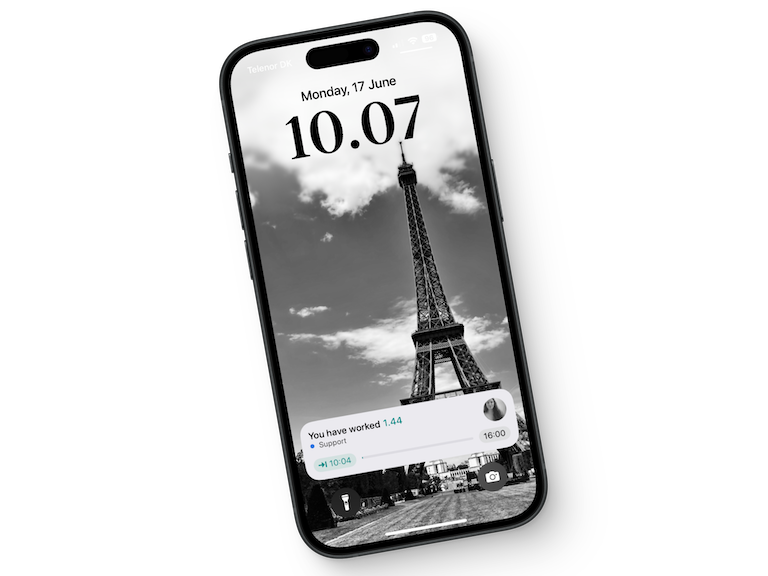
Live activities allow the employees to see how long they have been at work directly from their home screen. When an employee clocks in via our punch clock in the app, they will now see a live activity that shows their current working hours. If their iPhone supports it, there will also be a counter on the dynamic island at the top of the screen, providing a quick overview of the working hours when the phone is unlocked.
Click and clock out
One of the biggest advantages of live activities is that the employees can easily click on the activity and be taken directly to their shift in the app. Here, they can quickly clock out without having to spend time opening the app and finding their shift. This hopefully makes the clocking-out process easier and more time-efficient for the employees.
This means that with the update, the employees can get:
- Better overview: With a quick glance, the employees can instantly see how long they have been at work.
- Time savings: By simply clicking on the activity, the employee can be taken directly to their shift and clock out.
How to enable Live Activities on your iPhone
To use the new feature, the employees need to ensure that live activities are enabled on their iPhones. To enable live activities, do the following:
- Go to “Settings” on your iPhone.
- Select “Face ID & Passcode” or “Touch ID & Passcode,” depending on your model.
- Enter your passcode to access the settings.
- Scroll down and find the “Live Activities” section.
- Make sure that “Allow Live Activities” is turned on.
Then, ensure that you have the latest version of our app. Once this is done, live activities will automatically be displayed when you clock in and out via the Smartplan app.
So update your Smartplan app today and see how much easier it becomes to keep track of your working hours! We hope you will enjoy this new update as much as we do.
If you have any questions, as always, feel free to write to us at support@smartplanapp.com.
Smartplan
Published 17 June 2024
Ready to try Smartplan?
Start your free 30-day trial today. No commitment, no credit card required.
Try Smartplan freeGet to know Smartplan
Everything you need for shift planning, time tracking and employee management — all in one place.