


Exciting new features: Location allocation and superusers now available at Smartplan
Here we are, after months of planning, designing, coding, and testing. We’re putting it all out there, hoping it lives up to your expectations - or, even better, exceeds them.
You can now assign your employees to specific locations on your Smartplan account. At the same time, you can also grant certain employees superuser permissions.
Lots of consideration has gone into this update, all based on meticulously gathered customer requests. That is because with each single subscription, you are not only helping us maintaining our operational business, but directly investing into future development of our product. This is the reason why we always put our customers’ needs at the center of every step we make and any change we implement.
Both new features, the allocation of employees to locations and the introduction of a user role with custom permissions, are some of the biggest changes we have made to system in a long time. Whether you choose to use the new features are entirely up to you. We have made sure, that the implementation and use of the features will feel very intuitive. So if you choose to use them, it should feel like a natural extension of the system. Like it had always have been a part of Smartplan.
Every one of our customers will be able to benefit from these new features. Whether you are using locations for keeping the rotas for your stores/subsidiaries apart or using locations to reflect a structure of teams and team leads from your business - this update can improve your situation by giving you an even better overview, increase your employees data privacy and ultimately save you valuable time. Even if you are not dividing your rotas into locations, you might still want to give some of your admins more granular permissions and make them superusers instead.
Let’s have a quick look at what’s being introduced with each of these new features.
Assign your employees to locations
By assigning your employees to locations, both you and your employees can achieve an even better overview of all the data on your account. When you have to plan new rotas, the lists in the planning tool will only present you with employees who have been assigned to the specific location. No more going through long lists in order to find the correct employees.
At the same time, the employees will only be able to take and swap shifts in locations they are assigned to. This means, you don’t risk employees suddenly having shifts in locations they are not supposed to work in.
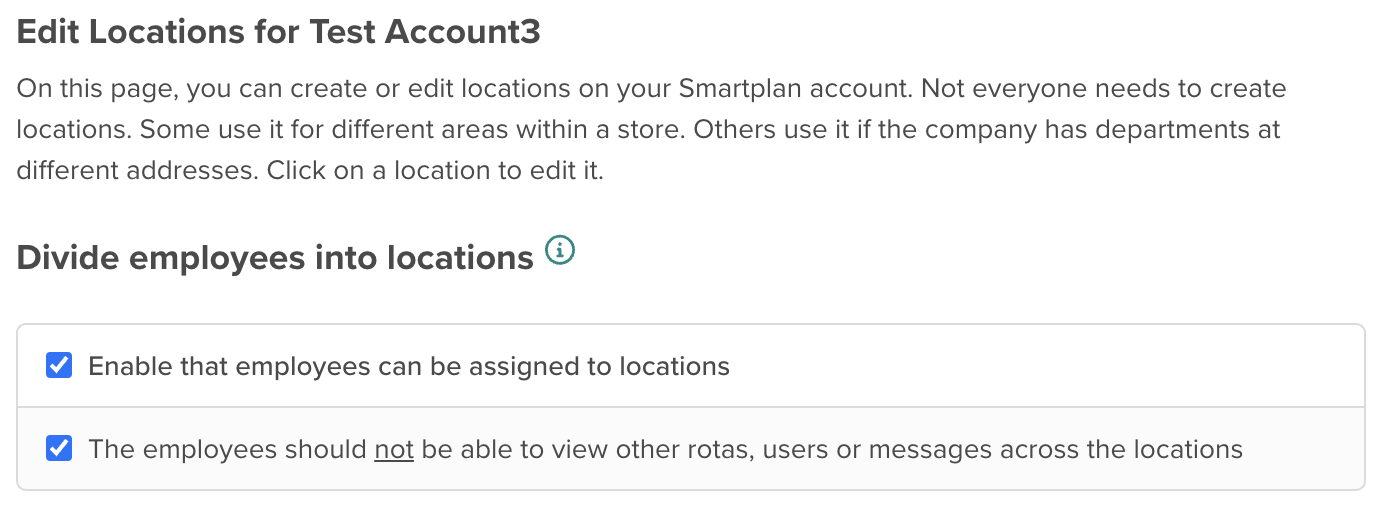
As default, the employees will be able to view all data (rotas, employees, absences etc.) on the account. But if you would prefer that the employees only can view data from their own locations, this is of course possible as well. Simply check the second box here, and the employees will no longer be able to view information from locations they are not assigned to:
Give employees superuser permissions
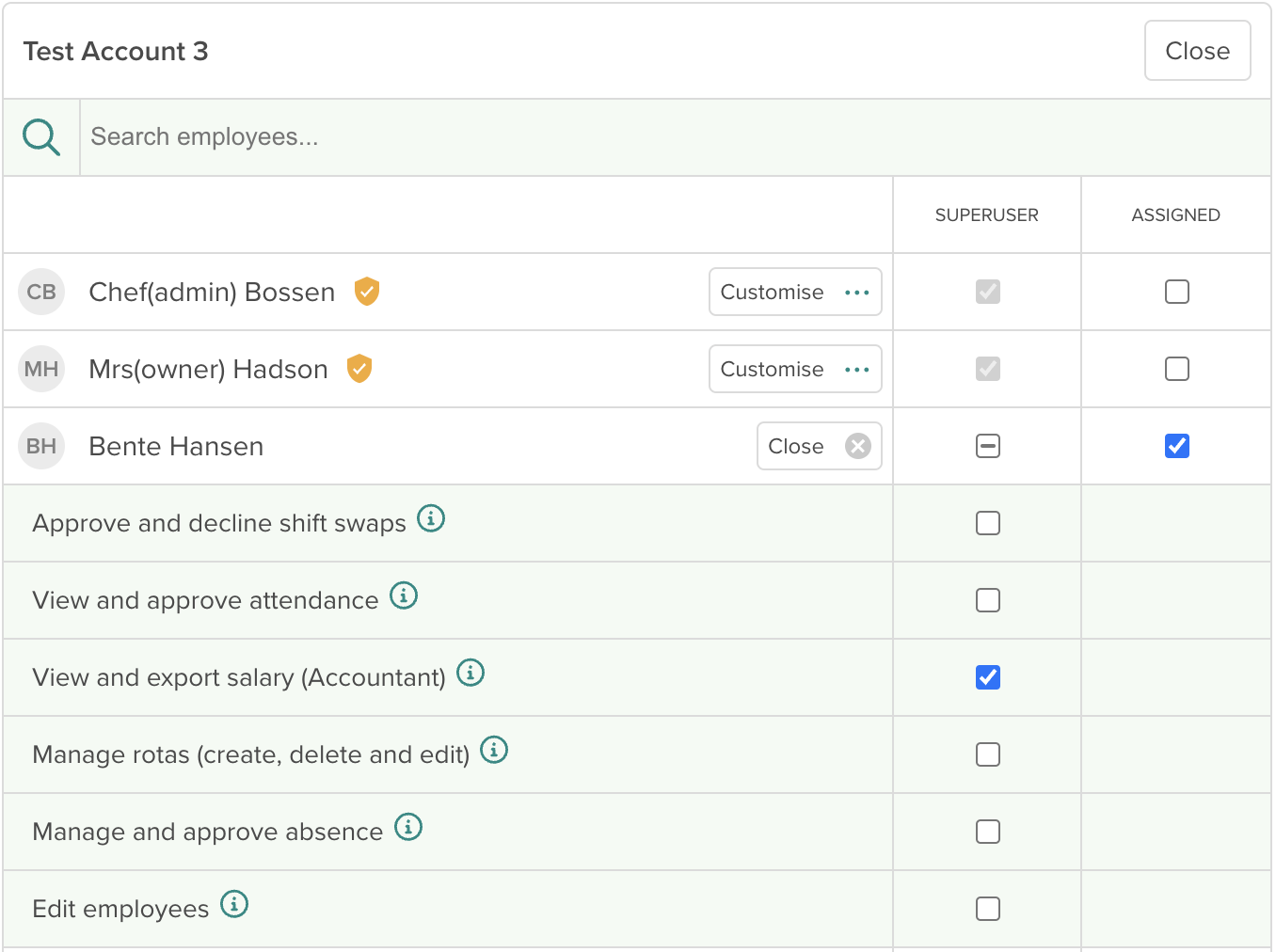
Up until now, all admins on your account have had the same permissions on your account. But now, you can choose to make the employees superusers instead of admins. If an employee is a superuser, you choose exactly which permissions they should have on the account. It is of course still possible to have admins if you prefer that.
You can choose to grant superusers the following permissions:
- Approve and decline shift swaps
- View and approve attendance
- View and export salary
- Manage rotas
- Manage and approve absences
- Edit employees
Stay tuned! In the coming days, we’ll be releasing a series of 3 articles right here on our blog. These will guide you on how to unleash the full potential of our two new features. Each of them will focus on how the features can be tailored to a specific need, that you or your team might have.
In the meantime, don’t hesitate to check out the possibilities of this update on your own. Here are two articles to help you get started:
If you have any doubts or questions that our help articles don’t clear up, don’t hesitate to reach out. You can contact us directly via the Help modal or by emailing us at support@smartplanapp.com.
Smartplan
Published 25 October 2023
Ready to try Smartplan?
Start your free 30-day trial today. No commitment, no credit card required.
Try Smartplan freeGet to know Smartplan
Everything you need for shift planning, time tracking and employee management — all in one place.