


Submit requests has been updated - making it easier to share when you can work
.png)
We’ve updated the design of the submit requests feature and introduced several new functionalities to make it easier for your employees to submit their requests. The app has received the most significant design update, but all the new features are available on both the app and a computer.
.png)
Let’s take a closer look at the new features we’ve introduced:
- A new weekly overview in the app gives you a quick glance at which days during the week you’ve marked at least one time slot as unavailable.
- Absences are automatically displayed with a small icon, so you always have a full overview of your absences when submitting requests. In the app, we specify the type of absence. On a computer, simply hover over the icon to see this information.
- A new button allows you to mark all time spans with approved absences as unavailable in one click.
- Mark an entire week or a day as available or unavailable with just one click. In the app, click the icon to the far right next to a week or a day. On a computer, click “Mark the week as unavailable” or the cross icon when hovering over a day.
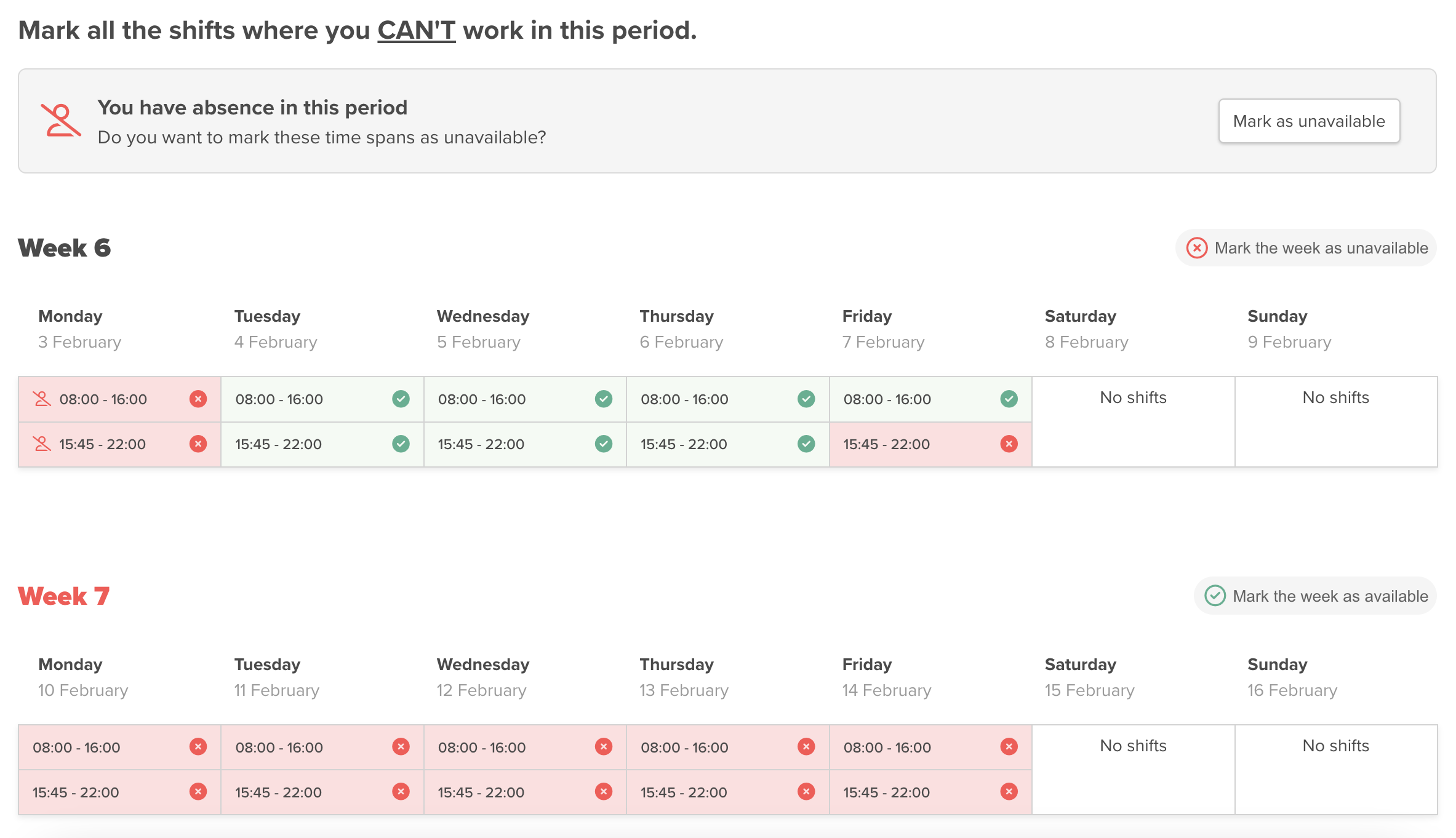
The new update makes it significantly easier for employees to submit requests for the rota. The improved design offers a better overview of the week’s status, with clear weekly summaries showing which days have already been marked as unavailable. With just a few clicks, you can quickly and easily adjust your requests, saving time and making the process more seamless.
Additionally, the automatic display of absences ensures a complete overview, so you don’t have to worry about missing any important details. This makes submitting your preferred work times both simpler and more efficient.
We are continuously working to enhance your experience with Smartplan, and these updates are another step in that direction. Try the new submit requests update today – we’re confident you’ll love it! And feel free to reach out to us at support@smartplanapp.com if you have any questions.
Smartplan
Published 14 January 2025
Ready to try Smartplan?
Start your free 30-day trial today. No commitment, no credit card required.
Try Smartplan freeGet to know Smartplan
Everything you need for shift planning, time tracking and employee management — all in one place.