


Say It Without Saying It: Introducing Reaction Messaging in Smartplan
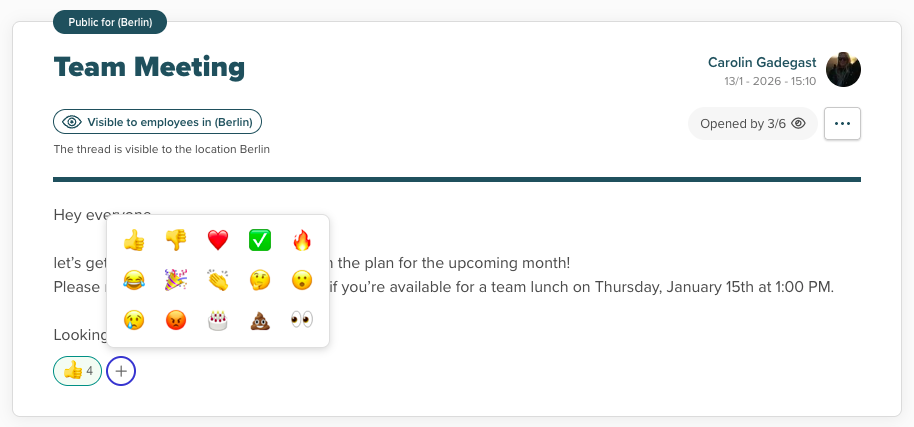
Sometimes a thumbs up says it all.
We've all been there. Your manager posts the new summer schedule, and you want to acknowledge it without cluttering the thread with "Got it!" or "Thanks!" messages. Or maybe a colleague shares some exciting news and you want to celebrate with them—but typing out "Congratulations!" feels a bit formal.
That's exactly why we're excited to introduce Reaction Messaging in Smartplan.
Quick Reactions, Less Noise
With our new reaction feature, you can now respond to any message with a single tap. Just click the + button below any message, and you'll see a curated selection of emojis ready to express exactly how you feel:
- 👍 Thumbs up — The classic acknowledgment
- ❤️ Heart — Show some love
- ✅ Checkmark — Message received, loud and clear
- 🔥 Fire — When something's absolutely on point
- 🎉 Party — Celebrate wins together
- 👏 Clapping — Give credit where it's due
- 🤔 Thinking — When you need a moment to consider
- 😂 Laughing — Because work should have its fun moments too
And if those don't quite fit the moment? We've got plenty more where those came from.
Why Reactions Matter for Workplace Communication
Here's the thing about team communication: not every response needs to be a full message. When your boss posts the weekly rota, they don't need 15 separate "Thanks!" replies flooding the thread. A simple thumbs up from everyone gets the point across while keeping your message inbox clean and scannable.
Reactions also add a human touch to digital communication. A quick party emoji on a "We hit our targets!" announcement feels more genuine than silence, and it helps build that sense of team spirit—even when everyone's not in the same room.
How It Works
Using reactions couldn't be simpler:
- Find the message you want to react to
- Click the + button that appears below the message
- Pick your emoji
- Done!
Your reaction appears as a small badge below the message, showing the emoji and how many people have reacted with it. Want to change your mind? Just click your reaction again to remove it.
Multiple people can add reactions to the same message, so you can see at a glance that the whole team has acknowledged an important update. No more wondering if everyone saw your message about the shift swap deadline.
A Small Feature, A Big Difference
We know reaction messaging might seem like a small addition, but it's these little touches that make daily communication smoother. Less clutter, more expression, and a bit more fun in your workday.
The feature is live now for all Smartplan users. Next time you see a message that deserves more than silence but less than a full reply, give reactions a try.
After all, sometimes a thumbs up really does say it all.
Have feedback on the new reaction feature? We'd love to hear from you. Drop us a line at support@trysmartplan.com.
Smartplan
Published 17 February 2026
Ready to try Smartplan?
Start your free 30-day trial today. No commitment, no credit card required.
Try Smartplan freeGet to know Smartplan
Everything you need for shift planning, time tracking and employee management — all in one place.